> ## Documentation Index
> Fetch the complete documentation index at: https://docs.nihalxkumar.dev/llms.txt
> Use this file to discover all available pages before exploring further.
# Core Features
> Overview of Arch MCP capabilities
Arch MCP Server provides three types of capabilities that work together to enable intelligent interaction with the Arch Linux ecosystem.
## 🔍 Resources
URI-based access to Arch ecosystem data - read documentation, package info, and system state.
**24 URI schemes** for accessing Arch Wiki, AUR packages, official repos, system data, logs, news, configuration, and mirrors
 **What you can do:**
* Access Arch Wiki pages in Markdown format
* Fetch PKGBUILD files with safety annotations
* Query AUR package metadata
* Look up official repository packages
* List installed packages (Arch only)
## 🛠️ Tools
Executable functions for search, security analysis, and package installation.
**22 unified tools** organized into 9 categories: discovery, lifecycle, maintenance, organization, security, monitoring, history, mirrors, and configuration
**What you can do:**
* Access Arch Wiki pages in Markdown format
* Fetch PKGBUILD files with safety annotations
* Query AUR package metadata
* Look up official repository packages
* List installed packages (Arch only)
## 🛠️ Tools
Executable functions for search, security analysis, and package installation.
**22 unified tools** organized into 9 categories: discovery, lifecycle, maintenance, organization, security, monitoring, history, mirrors, and configuration
 **What you can do:**
* Search Arch Wiki and AUR packages
* Analyze PKGBUILD files for security risks
* Evaluate package trustworthiness
* Check for system updates safely
* Install packages with automated security checks
## 📋 Prompts
Guided multi-step workflows that combine resources and tools for complex tasks.
**8 intelligent workflows** for troubleshooting, security audits, dependency analysis, system updates, cleanup, and health checks
**What you can do:**
* Search Arch Wiki and AUR packages
* Analyze PKGBUILD files for security risks
* Evaluate package trustworthiness
* Check for system updates safely
* Install packages with automated security checks
## 📋 Prompts
Guided multi-step workflows that combine resources and tools for complex tasks.
**8 intelligent workflows** for troubleshooting, security audits, dependency analysis, system updates, cleanup, and health checks
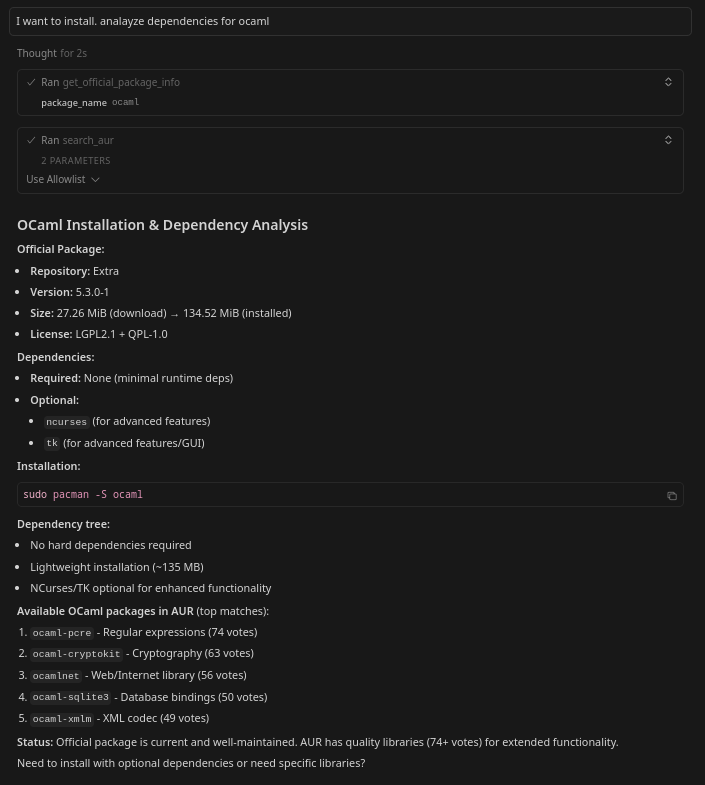 **What you can do:**
* Diagnose system issues with Wiki-guided solutions
* Audit AUR packages before installation
* Plan installations by analyzing dependencies
## Feature Comparison
Quick reference to understand what each capability type offers:
| Capability | Count | Access Method | Use When | Example |
| ------------- | ----- | ----------------- | ------------------------------ | ------------------------ |
| **Resources** | 23+ | URI schemes | Need raw data or documentation | `archwiki://Systemd` |
| **Tools** | 22 | Function calls | Need to perform operations | `search_aur query="vim"` |
| **Prompts** | 8 | Workflow triggers | Need guided multi-step process | `audit_aur_package` |
**Best Practice:** Combine all three types for powerful workflows! Resources provide data, Tools perform operations, and Prompts orchestrate complex tasks.
***
## How They Work Together
See how Resources, Tools, and Prompts combine to solve real problems.
### Interactive Workflow Example
**User Query:**
```
I want to install neofetch from AUR, but I'm concerned about security
```
The AI assistant automatically determines the best workflow for this request.
**Resource Access:**
```
aur://neofetch/pkgbuild
```
The system uses the PKGBUILD resource to fetch the raw build script for inspection.
Resources provide read-only access to data without executing anything.
**Tool Execution:**
```
audit_package_security action="pkgbuild_analysis" package_name="neofetch"
```
Scans for security threats:
* ✅ Dangerous commands (`rm -rf /`, `dd`, etc.)
* ✅ Suspicious downloads (`curl|sh`, `wget|bash`)
* ✅ Obfuscated code (base64, eval)
* ✅ Privilege escalation attempts
This tool uses pattern matching - always manually review PKGBUILDs too!
**Resource Access:**
```
aur://neofetch/info
```
Provides community trust indicators:
* Popularity votes (2,500+)
* Maintainer information
* Last update date
* Package age and history
**Tool Execution:**
```
audit_package_security action="metadata_risk" package_name="neofetch"
```
Evaluates:
* Is the maintainer trustworthy?
* How popular is this package?
* Is it actively maintained?
* Any red flags in metadata?
Trust score: 85/100 - High community trust
**Tool Execution:**
```
install_package_secure package="neofetch" aur=true
```
If security checks pass:
* Presents comprehensive security report
* Asks for final confirmation
* Handles installation with AUR helper
* Logs transaction for audit trail
Use `install_package_secure` instead of manual installation for built-in safety!
**Result:** You get a secure, well-informed AUR package installation with full understanding of what's being installed and why it's safe.
**Automation:** The entire workflow above can be triggered with a single prompt: `audit_aur_package package="neofetch"`
***
### Workflow Visualization
|Natural Language| B{AI Assistant}
B -->|Fetch Data| C[Resources]
B -->|Perform Actions| D[Tools]
B -->|Complex Task| E[Prompts]
C --> F[archwiki://]
C --> G[aur://pkgbuild]
C --> H[aur://info]
D --> I[audit_package_security]
D --> J[audit_package_security]
D --> K[install_package_secure]
E --> L[audit_aur_package]
E --> M[troubleshoot]
E --> N[analyze_dependencies]
L --> C
L --> D
M --> C
M --> D
N --> C
N --> D
F --> O[Markdown Content]
G --> P[PKGBUILD File]
H --> Q[JSON Metadata]
I --> R[Security Report]
J --> S[Trust Score]
K --> T[Installation Result]
O --> U[AI Response]
P --> U
Q --> U
R --> U
S --> U
T --> U
`}
/>
**Pro Tip:** You don't need to know all this! Just ask in natural language, and the AI figures out the optimal workflow.
## Capability Statistics
URI-based data access for Wiki pages, PKGBUILDs, package info, and system data
Executable functions across 9 categories for all Arch Linux operations
Guided workflows for troubleshooting, auditing, system updates, cleanup, and health checks
### Tools by Category
| Category | Tool Count | Permission | Common Uses |
| -------------------------- | ---------- | ---------- | -------------------------------- |
| 🔍 Discovery & Information | 4 | Read | Search Wiki/AUR, get news |
| 📦 Package Lifecycle | 3 | Mixed | Install, update, remove packages |
| 🔧 Package Maintenance | 4 | Mixed | Verify, mark, clean orphans |
| 📁 File Organization | 2 | Read | Find owners, list files, search |
| 🔒 Security Analysis | 1 | Read | PKGBUILD/metadata scanning |
| 📊 System Monitoring | 4 | Read | Disk space, services, logs |
| 📜 Transaction History | 1 | Read | Audit package operations |
| 🌐 Mirror Management | 1 | Read | Test speed, suggest mirrors |
| ⚙️ Configuration | 2 | Read | Parse pacman/makepkg configs |
**Platform Support:**
* **7 tools** work on any platform (use remote APIs)
* **1 tool** works on systemd-based systems
* **14 tools** require Arch Linux (use local system)
* **All resources** work on any platform
## Learn More
PKGBUILD analysis and safety mechanisms
Practical usage scenarios
Design and implementation details
**What you can do:**
* Diagnose system issues with Wiki-guided solutions
* Audit AUR packages before installation
* Plan installations by analyzing dependencies
## Feature Comparison
Quick reference to understand what each capability type offers:
| Capability | Count | Access Method | Use When | Example |
| ------------- | ----- | ----------------- | ------------------------------ | ------------------------ |
| **Resources** | 23+ | URI schemes | Need raw data or documentation | `archwiki://Systemd` |
| **Tools** | 22 | Function calls | Need to perform operations | `search_aur query="vim"` |
| **Prompts** | 8 | Workflow triggers | Need guided multi-step process | `audit_aur_package` |
**Best Practice:** Combine all three types for powerful workflows! Resources provide data, Tools perform operations, and Prompts orchestrate complex tasks.
***
## How They Work Together
See how Resources, Tools, and Prompts combine to solve real problems.
### Interactive Workflow Example
**User Query:**
```
I want to install neofetch from AUR, but I'm concerned about security
```
The AI assistant automatically determines the best workflow for this request.
**Resource Access:**
```
aur://neofetch/pkgbuild
```
The system uses the PKGBUILD resource to fetch the raw build script for inspection.
Resources provide read-only access to data without executing anything.
**Tool Execution:**
```
audit_package_security action="pkgbuild_analysis" package_name="neofetch"
```
Scans for security threats:
* ✅ Dangerous commands (`rm -rf /`, `dd`, etc.)
* ✅ Suspicious downloads (`curl|sh`, `wget|bash`)
* ✅ Obfuscated code (base64, eval)
* ✅ Privilege escalation attempts
This tool uses pattern matching - always manually review PKGBUILDs too!
**Resource Access:**
```
aur://neofetch/info
```
Provides community trust indicators:
* Popularity votes (2,500+)
* Maintainer information
* Last update date
* Package age and history
**Tool Execution:**
```
audit_package_security action="metadata_risk" package_name="neofetch"
```
Evaluates:
* Is the maintainer trustworthy?
* How popular is this package?
* Is it actively maintained?
* Any red flags in metadata?
Trust score: 85/100 - High community trust
**Tool Execution:**
```
install_package_secure package="neofetch" aur=true
```
If security checks pass:
* Presents comprehensive security report
* Asks for final confirmation
* Handles installation with AUR helper
* Logs transaction for audit trail
Use `install_package_secure` instead of manual installation for built-in safety!
**Result:** You get a secure, well-informed AUR package installation with full understanding of what's being installed and why it's safe.
**Automation:** The entire workflow above can be triggered with a single prompt: `audit_aur_package package="neofetch"`
***
### Workflow Visualization
|Natural Language| B{AI Assistant}
B -->|Fetch Data| C[Resources]
B -->|Perform Actions| D[Tools]
B -->|Complex Task| E[Prompts]
C --> F[archwiki://]
C --> G[aur://pkgbuild]
C --> H[aur://info]
D --> I[audit_package_security]
D --> J[audit_package_security]
D --> K[install_package_secure]
E --> L[audit_aur_package]
E --> M[troubleshoot]
E --> N[analyze_dependencies]
L --> C
L --> D
M --> C
M --> D
N --> C
N --> D
F --> O[Markdown Content]
G --> P[PKGBUILD File]
H --> Q[JSON Metadata]
I --> R[Security Report]
J --> S[Trust Score]
K --> T[Installation Result]
O --> U[AI Response]
P --> U
Q --> U
R --> U
S --> U
T --> U
`}
/>
**Pro Tip:** You don't need to know all this! Just ask in natural language, and the AI figures out the optimal workflow.
## Capability Statistics
URI-based data access for Wiki pages, PKGBUILDs, package info, and system data
Executable functions across 9 categories for all Arch Linux operations
Guided workflows for troubleshooting, auditing, system updates, cleanup, and health checks
### Tools by Category
| Category | Tool Count | Permission | Common Uses |
| -------------------------- | ---------- | ---------- | -------------------------------- |
| 🔍 Discovery & Information | 4 | Read | Search Wiki/AUR, get news |
| 📦 Package Lifecycle | 3 | Mixed | Install, update, remove packages |
| 🔧 Package Maintenance | 4 | Mixed | Verify, mark, clean orphans |
| 📁 File Organization | 2 | Read | Find owners, list files, search |
| 🔒 Security Analysis | 1 | Read | PKGBUILD/metadata scanning |
| 📊 System Monitoring | 4 | Read | Disk space, services, logs |
| 📜 Transaction History | 1 | Read | Audit package operations |
| 🌐 Mirror Management | 1 | Read | Test speed, suggest mirrors |
| ⚙️ Configuration | 2 | Read | Parse pacman/makepkg configs |
**Platform Support:**
* **7 tools** work on any platform (use remote APIs)
* **1 tool** works on systemd-based systems
* **14 tools** require Arch Linux (use local system)
* **All resources** work on any platform
## Learn More
PKGBUILD analysis and safety mechanisms
Practical usage scenarios
Design and implementation details